MercadoPago
Setting up CheckoutJoy to accept payments using MercadoPago
Mercado Pago
This guide will walk through setting up CheckoutJoy to accept payments with MercadoPago.
Supported Payment Options
- One-time payments
- Multiple payments
- Subscriptions
How to receive payments in different currencies
Currently, Mercado Pago only allows payments in the local currency. That is, the account created in Colombia only accepts payments in Colombian pesos (COP) and from clients that have an account in the same country. See this FAQ for more information.
Set up your MercadoPago Integration
To connect your MercadoPago account to CheckoutJoy, you will need to create an Integration in your MercadoPago account. This will allow CheckoutJoy to communicate with your MercadoPago account.
In your MercadoPago dashboard
- Navigate to your developer dashboard
- Create a new application by clicking on the Create Application button
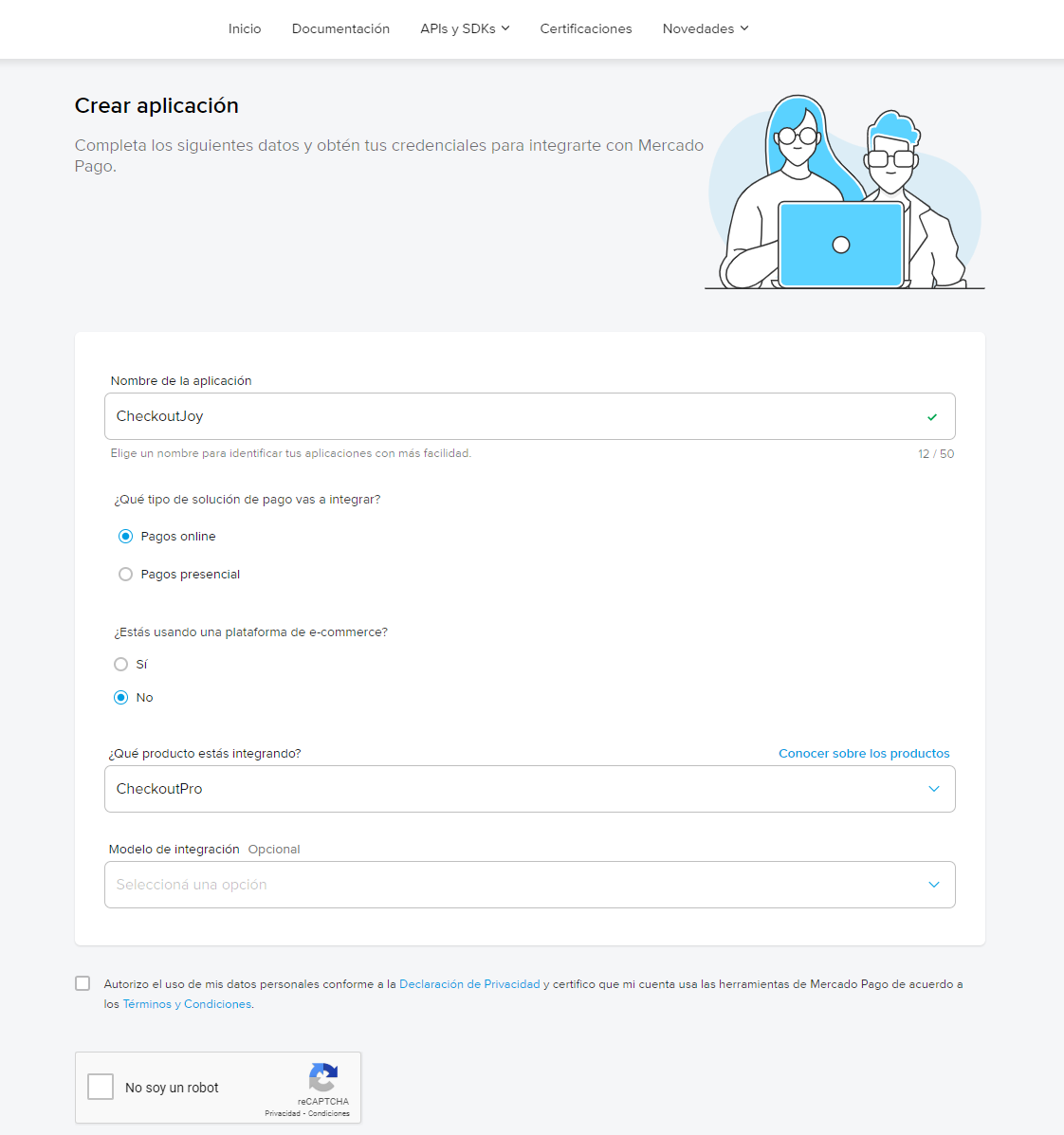
- Fill in the form with the following information:
- Name: CheckoutJoy
- Type of Integration: Online
- Platform: No
- Product: Checkout Pro
Finding your Credentials
Once you've created your integration, you will need to find your Access Token and Public Key.
In your MercadoPago dashboard:
- Navigate to Settings > Management and administration
- Click on the Checkout Pro tab
- Copy your Production Credentials (Access Token and Public Key) and paste them into the CheckoutJoy dashboard at Settings > Payment Processors > MercadoPago
Mercado Pago issues four production credentials: Public Key, Access Token, Client ID, and Client Secret. All four are entered into the CheckoutJoy Mercado Pago integration screen — CheckoutJoy maps each one to the right Mercado Pago endpoint.
Verifying the integration works
Run an end-to-end test purchase. If the checkout successfully redirects to Mercado Pago, your credentials are valid. Complete the payment to confirm webhook delivery — the order should be marked Completed in CheckoutJoy and any post-purchase automation (course access, tag assignment) should fire.
Frequently asked questions
My Mercado Pago is connected but I don't see [currency, e.g. PEN] as a chargeable option
Some Mercado Pago currencies need to be enabled manually for your account by CheckoutJoy support before they appear in the currency picker. PEN (Peruvian Sol) is one example. Contact support and tell us which currency you need enabled — we'll switch it on for your account.
After enabling, if the pay button still doesn't complete the transaction, the failure is on the Mercado Pago side — verify your Mercado Pago account is fully onboarded and approved to settle in that currency.
Can I use Mercado Pago with HighLevel (GoHighLevel)?
Yes. The CheckoutJoy ↔ HighLevel tutorial demonstrates Stripe, but you can substitute Mercado Pago (or any other connected CheckoutJoy processor) wherever Stripe appears in the setup.